> For the complete documentation index, see [llms.txt](https://support.happydemics.com/llms.txt). Markdown versions of documentation pages are available by appending `.md` to page URLs; this page is available as [Markdown](https://support.happydemics.com/account-management/consumption/how-to-download-brand-lifts-consumption.md).
# How to download brand lifts consumption?
How to download the list of Brand lifts
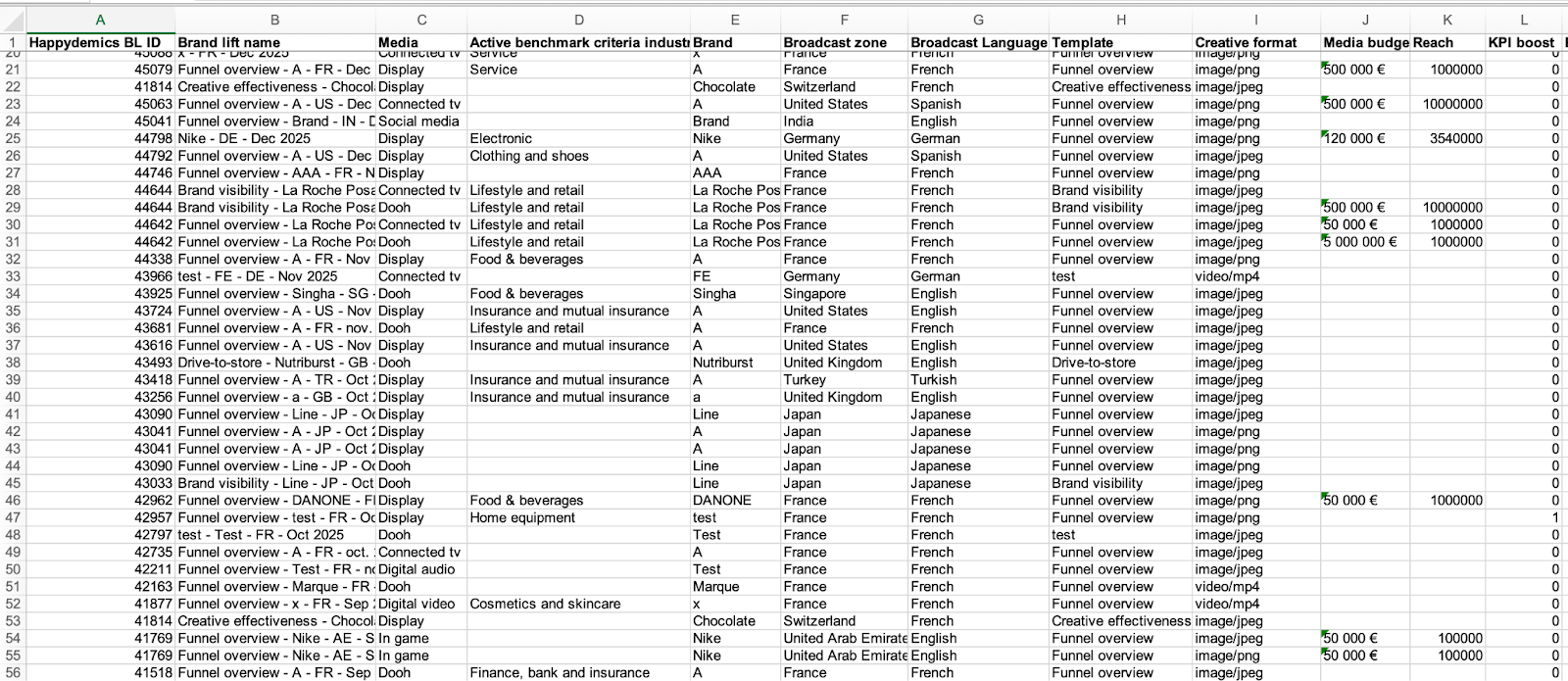
In **Organization > Plan & Usage > Consumption**, you can download the list of Brand Lifts in .xls format.
In the file, you’ll find:
* Brand Lift ID and name
* Media
* Active benchmark criteria industry
* Brand
* Broadcast zone
* Broadcast language
* Template
* Creative format
* Media budget
* Reach
* KPI, profiling, and collection boosts
* Ad campaign start and end dates
* Broadcasting start and end dates
* Respondents
* Impact score
* Status
* Author
* Results
**Can I select and filter what I want to export ?**
No, not at the moment. However, feel free to reach out to **** to share your improvement ideas.
👋 If you don't find your answer, feel free to reach out to **** for further consideration !
### **🚀 Related articles**
* [How to track my measurement use?](/account-management/consumption/how-to-track-my-measurement-use.md)
* [Organization access management](/account-management/settings/organization-access-management.md)
* [How to download my Brand lift results ?](/analysis/how-to-download-my-brand-lift-results.md)